Controls
Radio groups
Select exactly one stable-ID option from a visible bounded group.
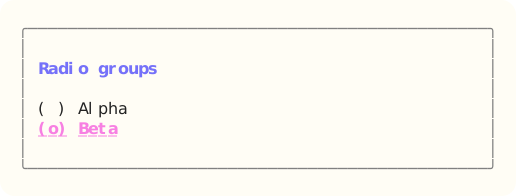
The site build compiles the dedicated Ada component example, constructs Radio groups through its public API, and exports that exact styled surface. Read the capture source.
When to use it
Use radio groups when comparing all choices matters and exactly one item must be active.
State and ownership
The Flyology_TUI.Components.Radio_Groups package defines this component.
The model retains selected and focused IDs plus capture. Disabled items remain present but are skipped by navigation.
- The application model owner applies updates during serial event dispatch.
- Appearance and skin values are borrowed only while the component renders.
Input and updates
Arrows move and select. Enter, Space, and matching mouse release activate the focused option.
Integration sequence
- Create the bounded model and populate it with caller-owned data.
- Route the current keyboard or local mouse event through the component handler.
- Apply the typed result, then render from the updated model with the current appearance.
See the linked package reference for its exact declarations and contracts.
Responsive and accessible behavior
- Use dimensions and regions from the current layout or presentation value.
- When a component owns mouse capture, route its matching release even when the pointer leaves the original bounds.
- Retain a glyph, label, border, or text-attribute cue when the terminal reduces color.